

Weave for Agents is in public preview. Features, APIs, and the Agents view UI may change before general availability.
Get started
To view signals for your project:- Navigate to https://wandb.ai and select your project.
- In the sidebar menu, select Agents to view all agent conversations saved for your project.
- In the tab bar, click Signals.
Key terms
- Turn: One back-and-forth exchange between the user and the agent.
- Rating: A numeric score between 0.0 and 1.0 assigned to a matching span.
- Tags: Labels assigned to matching spans, such as “user-frustration” or “nsfw”.
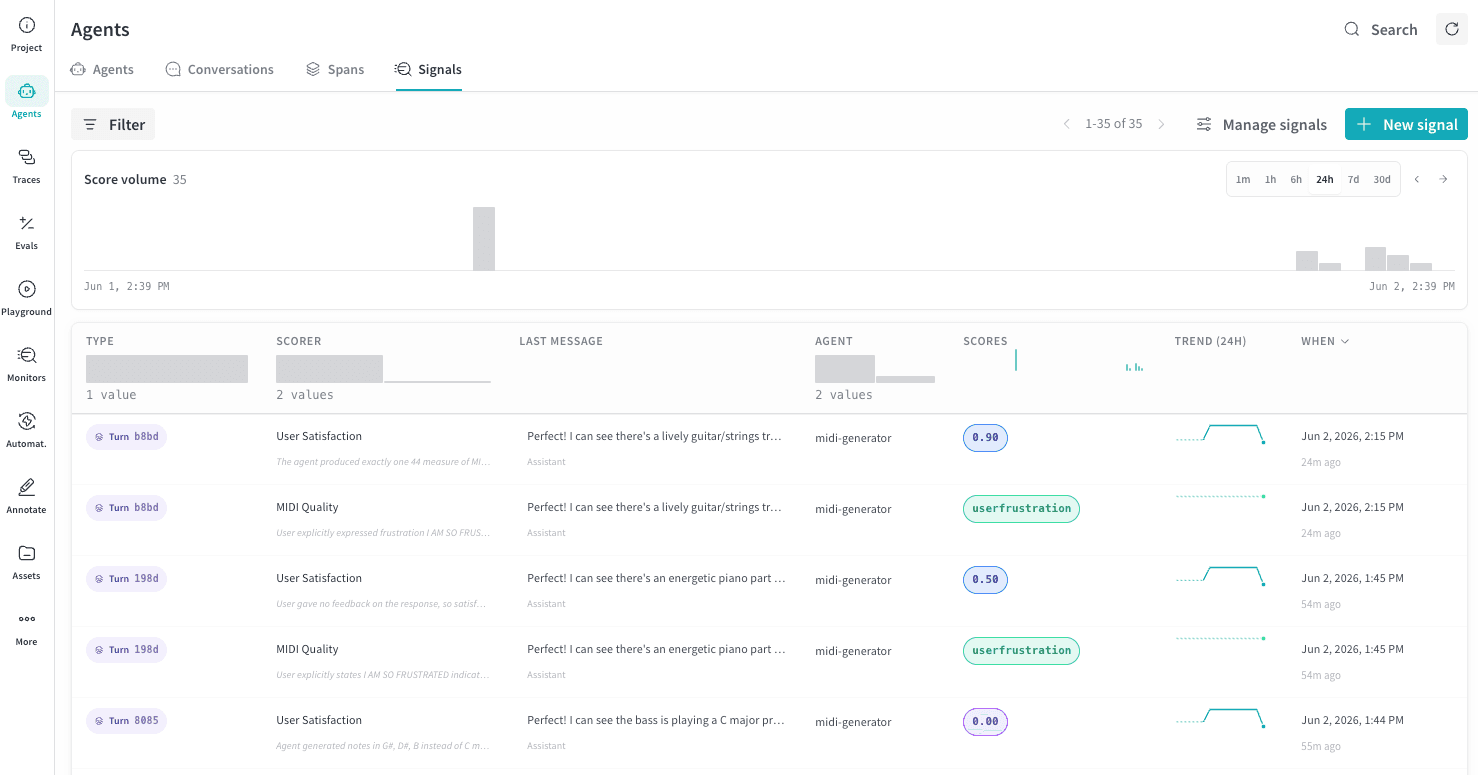
Signals table
Each row represents the output of one of your signal monitors. The following columns appear by default.
Use the time window selector and Filter bar to narrow results by scorer, agent, score range, or time period. The Score volume timeline shows counts of signals that have been evaluated for ratings or tagged. It reflects the rows shown in the table and supports drag-to-filter on the timeline.
Create a new signal
Select + New signal to create a new scorer for your agent.Scorer type
Choose to create either a Rating scorer or a Tags scorer.- Rating: Assigns a score between 0 and 1 to each matching span.
- Tags: Assigns up to 10 tags to each matching span. The signals UI only displays rows for spans that matched at least one tag, so your tag scorer might be working even if you don’t see any output.
Only score turns matching
Use this selector to restrict which turns the signal scores, such as a specificAgent name, Operation name, Tool name, or Request model. Multiple filters are combined with AND logic. To score every turn, select the x at the end of the filter row to remove it.
Prompt template
Choose a starter template from the lists below, then adjust the prompt that appears inline as Scorer prompt. Weave resolves template variables, such as{input_messages}, {output_messages}, and {system_instructions}, during scoring.
Rating templates
Tags templates
Scorer name
Choose the display name for this signal.Advanced settings
Under Advanced, configure the following options.- Inference model: The LLM to use for scoring. Serverless Inference is the recommended default when available.
- Sample rate: For high-traffic agents, set a sample rate to score a fraction of turns instead of every turn and reduce cost.