> ## Documentation Index
> Fetch the complete documentation index at: https://wb-21fd5541-mintlify-bbaa8558.mintlify.site/llms.txt
> Use this file to discover all available pages before exploring further.
# Scikit-Learn
> Use W&B to visualize and compare scikit-learn model performance with experiment tracking and automated plot logging.
You can use wandb to visualize and compare your scikit-learn models' performance with just a few lines of code. [Try an example →](https://wandb.me/scikit-colab)
## Get started
### Sign up and create an API key
An API key authenticates your machine to W\&B. You can generate an API key from your user profile.
For a more streamlined approach, create an API key by going directly to [User Settings](https://wandb.ai/settings). Copy the newly created API key immediately and save it in a secure location such as a password manager.
1. Click your user profile icon in the upper right corner.
2. Select **User Settings**, then scroll to the **API Keys** section.
### Install the `wandb` library and log in
To install the `wandb` library locally and log in:
1. Set the `WANDB_API_KEY` [environment variable](/models/track/environment-variables/) to your API key.
```bash theme={null}
export WANDB_API_KEY=
```
2. Install the `wandb` library and log in.
```shell theme={null}
pip install wandb
wandb login
```
```bash theme={null}
pip install wandb
```
```python theme={null}
import wandb
wandb.login()
```
```notebook theme={null}
!pip install wandb
import wandb
wandb.login()
```
### Log metrics
```python theme={null}
import wandb
wandb.init(project="visualize-sklearn") as run:
y_pred = clf.predict(X_test)
accuracy = sklearn.metrics.accuracy_score(y_true, y_pred)
# If logging metrics over time, then use run.log
run.log({"accuracy": accuracy})
# OR to log a final metric at the end of training you can also use run.summary
run.summary["accuracy"] = accuracy
```
### Make plots
#### Step 1: Import wandb and initialize a new run
```python theme={null}
import wandb
run = wandb.init(project="visualize-sklearn")
```
#### Step 2: Visualize plots
#### Individual plots
After training a model and making predictions you can then generate plots in wandb to analyze your predictions. See the **Supported Plots** section below for a full list of supported charts.
```python theme={null}
# Visualize single plot
wandb.sklearn.plot_confusion_matrix(y_true, y_pred, labels)
```
#### All plots
W\&B has functions such as `plot_classifier` that will plot several relevant plots:
```python theme={null}
# Visualize all classifier plots
wandb.sklearn.plot_classifier(
clf,
X_train,
X_test,
y_train,
y_test,
y_pred,
y_probas,
labels,
model_name="SVC",
feature_names=None,
)
# All regression plots
wandb.sklearn.plot_regressor(reg, X_train, X_test, y_train, y_test, model_name="Ridge")
# All clustering plots
wandb.sklearn.plot_clusterer(
kmeans, X_train, cluster_labels, labels=None, model_name="KMeans"
)
run.finish()
```
#### Existing Matplotlib plots
Plots created on Matplotlib can also be logged on W\&B Dashboard. To do that, it is first required to install `plotly`.
```bash theme={null}
pip install plotly
```
Finally, the plots can be logged on W\&B's dashboard as follows:
```python theme={null}
import matplotlib.pyplot as plt
import wandb
with wandb.init(project="visualize-sklearn") as run:
# do all the plt.plot(), plt.scatter(), etc. here.
# ...
# instead of doing plt.show() do:
run.log({"plot": plt})
```
## Supported plots
### Learning curve
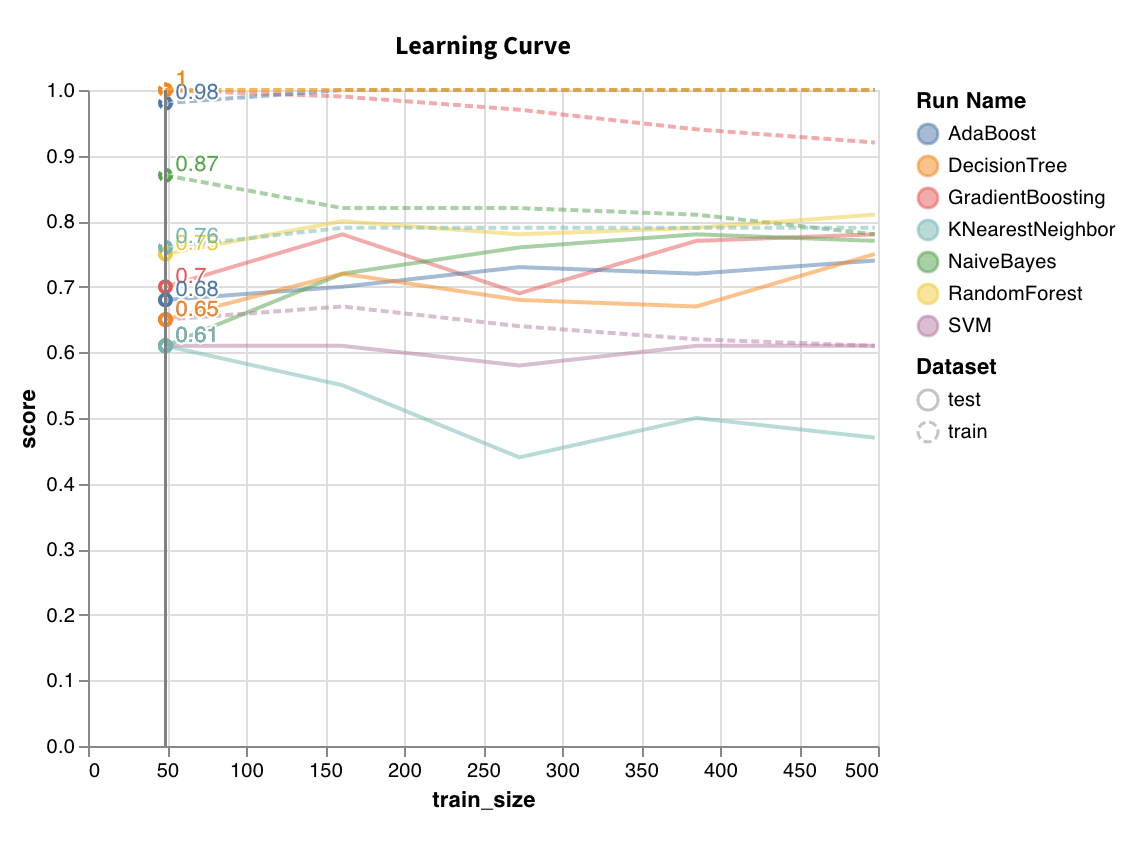 Trains model on datasets of varying lengths and generates a plot of cross validated scores vs dataset size, for both training and test sets.
`wandb.sklearn.plot_learning_curve(model, X, y)`
* model (clf or reg): Takes in a fitted regressor or classifier.
* X (arr): Dataset features.
* y (arr): Dataset labels.
### ROC
Trains model on datasets of varying lengths and generates a plot of cross validated scores vs dataset size, for both training and test sets.
`wandb.sklearn.plot_learning_curve(model, X, y)`
* model (clf or reg): Takes in a fitted regressor or classifier.
* X (arr): Dataset features.
* y (arr): Dataset labels.
### ROC
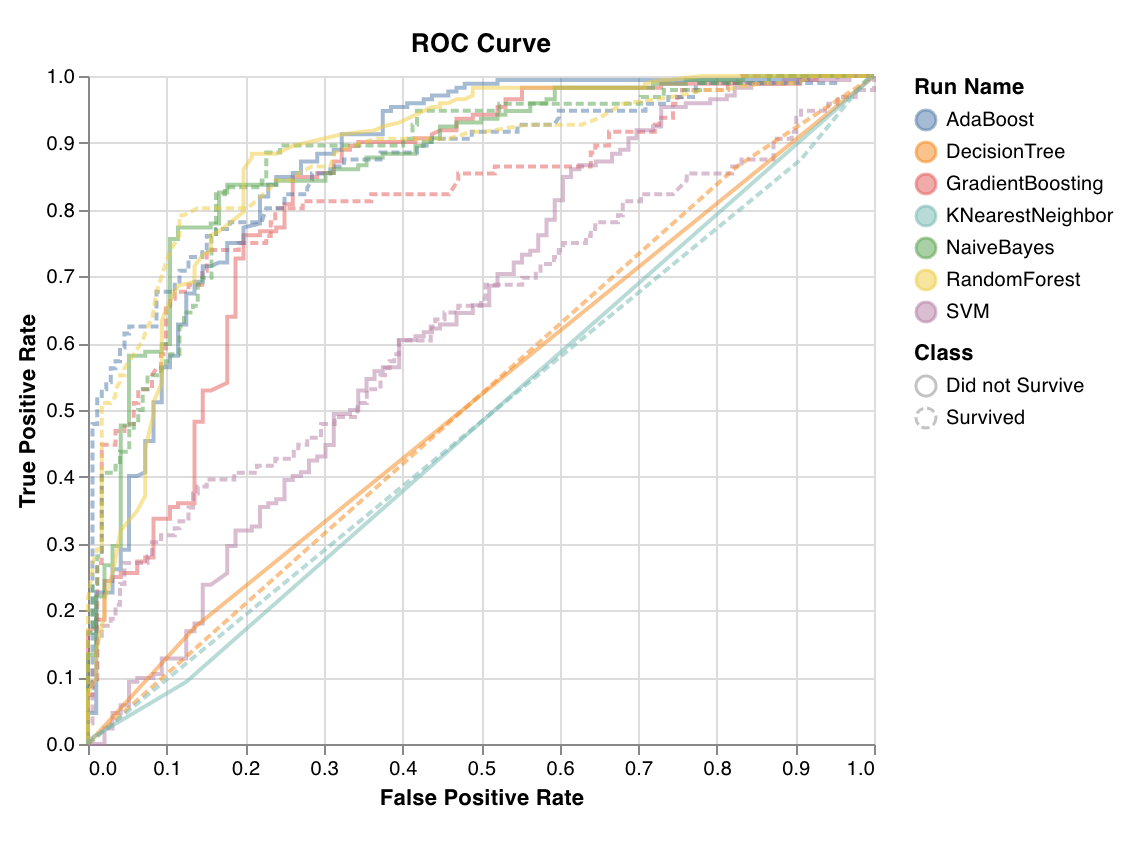 ROC curves plot true positive rate (y-axis) vs false positive rate (x-axis). The ideal score is a TPR = 1 and FPR = 0, which is the point on the top left. Typically we calculate the area under the ROC curve (AUC-ROC), and the greater the AUC-ROC the better.
`wandb.sklearn.plot_roc(y_true, y_probas, labels)`
* y\_true (arr): Test set labels.
* y\_probas (arr): Test set predicted probabilities.
* labels (list): Named labels for target variable (y).
### Class proportions
ROC curves plot true positive rate (y-axis) vs false positive rate (x-axis). The ideal score is a TPR = 1 and FPR = 0, which is the point on the top left. Typically we calculate the area under the ROC curve (AUC-ROC), and the greater the AUC-ROC the better.
`wandb.sklearn.plot_roc(y_true, y_probas, labels)`
* y\_true (arr): Test set labels.
* y\_probas (arr): Test set predicted probabilities.
* labels (list): Named labels for target variable (y).
### Class proportions
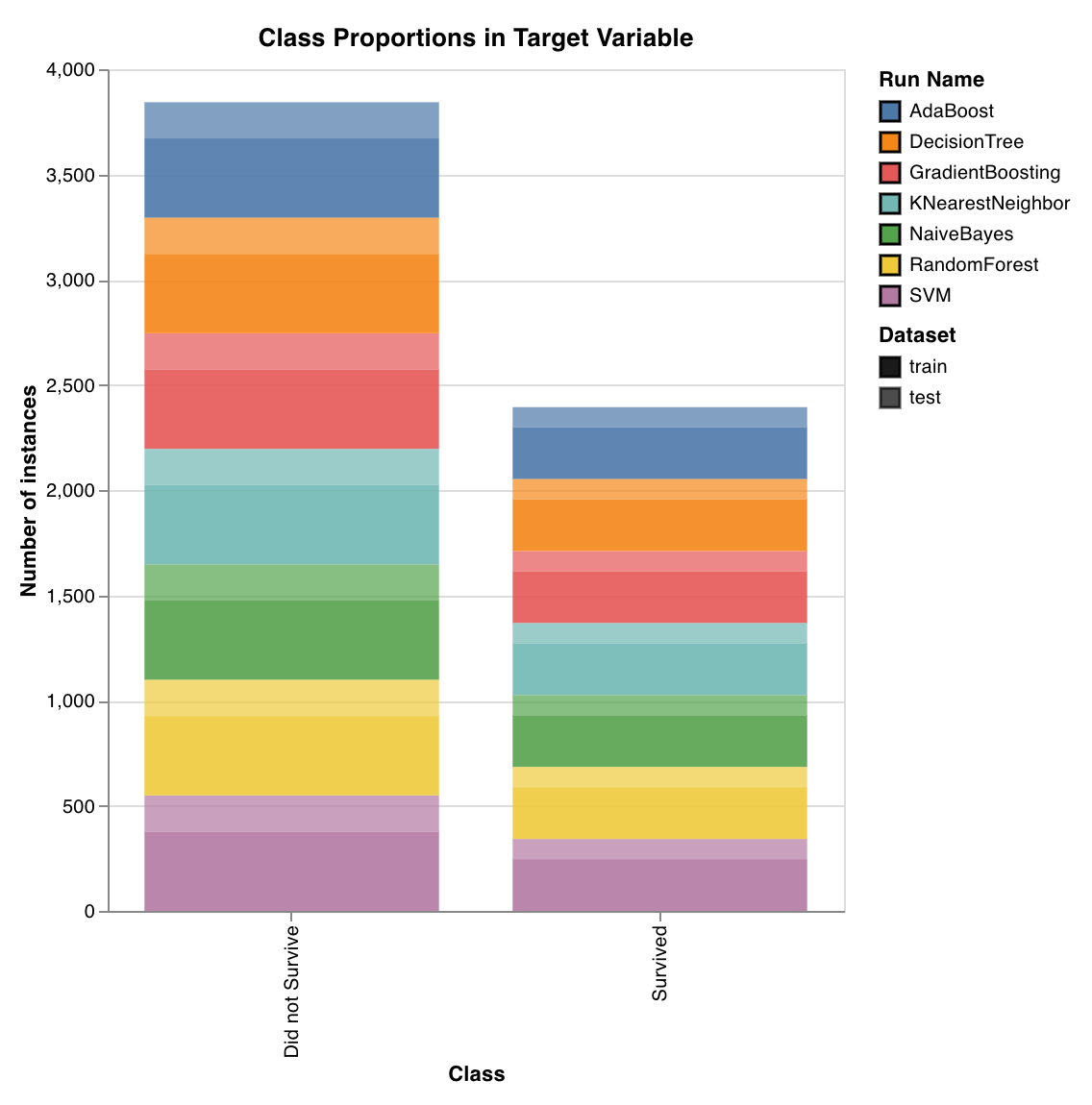 Plots the distribution of target classes in training and test sets. Useful for detecting imbalanced classes and ensuring that one class doesn't have a disproportionate influence on the model.
`wandb.sklearn.plot_class_proportions(y_train, y_test, ['dog', 'cat', 'owl'])`
* y\_train (arr): Training set labels.
* y\_test (arr): Test set labels.
* labels (list): Named labels for target variable (y).
### Precision recall curve
Plots the distribution of target classes in training and test sets. Useful for detecting imbalanced classes and ensuring that one class doesn't have a disproportionate influence on the model.
`wandb.sklearn.plot_class_proportions(y_train, y_test, ['dog', 'cat', 'owl'])`
* y\_train (arr): Training set labels.
* y\_test (arr): Test set labels.
* labels (list): Named labels for target variable (y).
### Precision recall curve
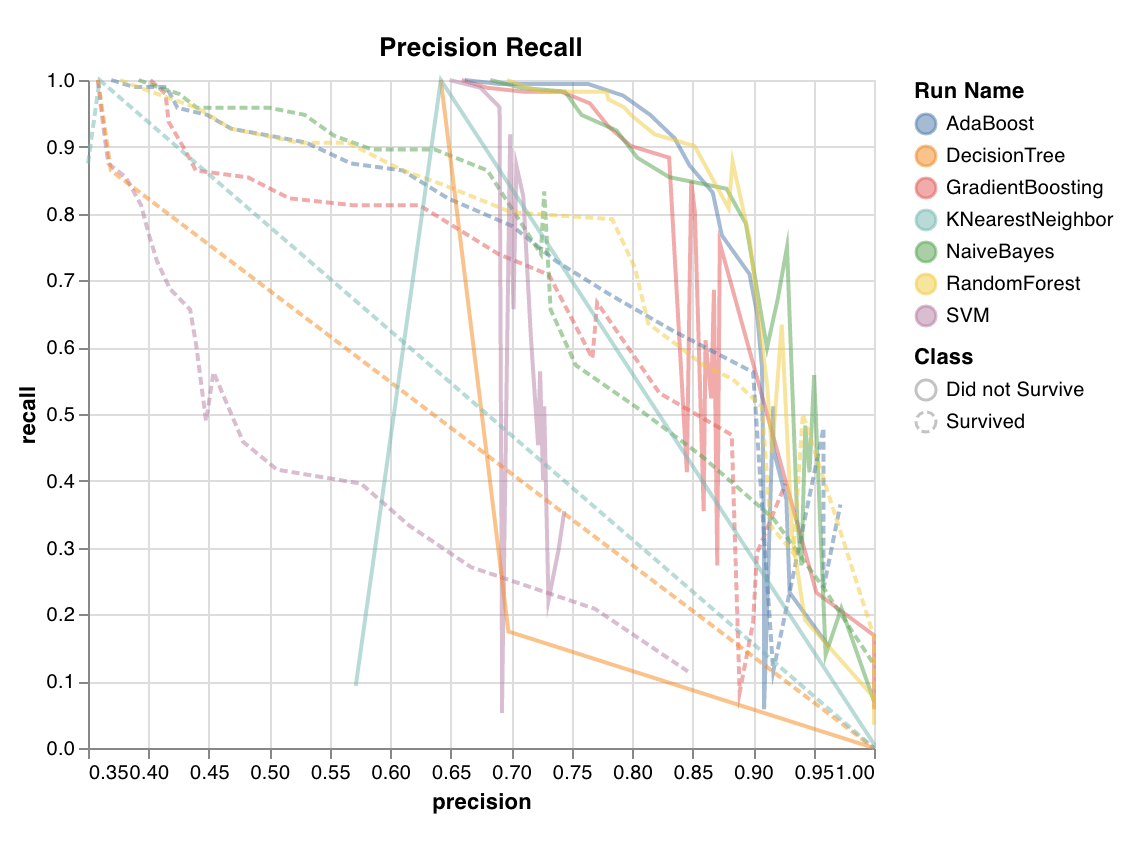 Computes the tradeoff between precision and recall for different thresholds. A high area under the curve represents both high recall and high precision, where high precision relates to a low false positive rate, and high recall relates to a low false negative rate.
High scores for both show that the classifier is returning accurate results (high precision), as well as returning a majority of all positive results (high recall). PR curve is useful when the classes are very imbalanced.
`wandb.sklearn.plot_precision_recall(y_true, y_probas, labels)`
* y\_true (arr): Test set labels.
* y\_probas (arr): Test set predicted probabilities.
* labels (list): Named labels for target variable (y).
### Feature importances
Computes the tradeoff between precision and recall for different thresholds. A high area under the curve represents both high recall and high precision, where high precision relates to a low false positive rate, and high recall relates to a low false negative rate.
High scores for both show that the classifier is returning accurate results (high precision), as well as returning a majority of all positive results (high recall). PR curve is useful when the classes are very imbalanced.
`wandb.sklearn.plot_precision_recall(y_true, y_probas, labels)`
* y\_true (arr): Test set labels.
* y\_probas (arr): Test set predicted probabilities.
* labels (list): Named labels for target variable (y).
### Feature importances
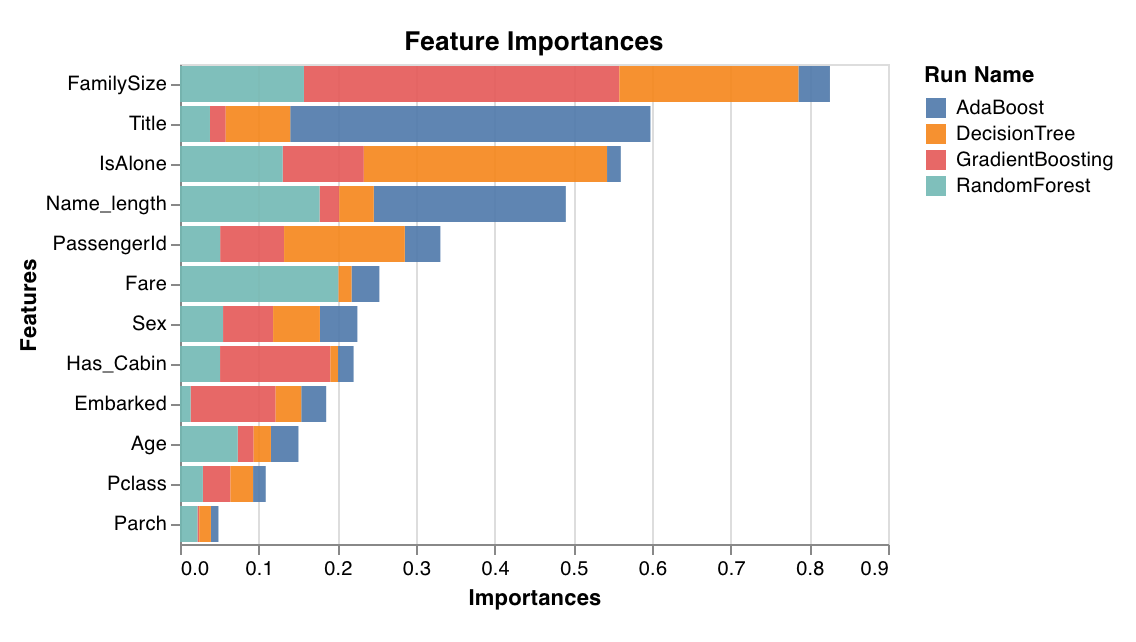 Evaluates and plots the importance of each feature for the classification task. Only works with classifiers that have a `feature_importances_` attribute, like trees.
`wandb.sklearn.plot_feature_importances(model, ['width', 'height, 'length'])`
* model (clf): Takes in a fitted classifier.
* feature\_names (list): Names for features. Makes plots easier to read by replacing feature indexes with corresponding names.
### Calibration curve
Evaluates and plots the importance of each feature for the classification task. Only works with classifiers that have a `feature_importances_` attribute, like trees.
`wandb.sklearn.plot_feature_importances(model, ['width', 'height, 'length'])`
* model (clf): Takes in a fitted classifier.
* feature\_names (list): Names for features. Makes plots easier to read by replacing feature indexes with corresponding names.
### Calibration curve
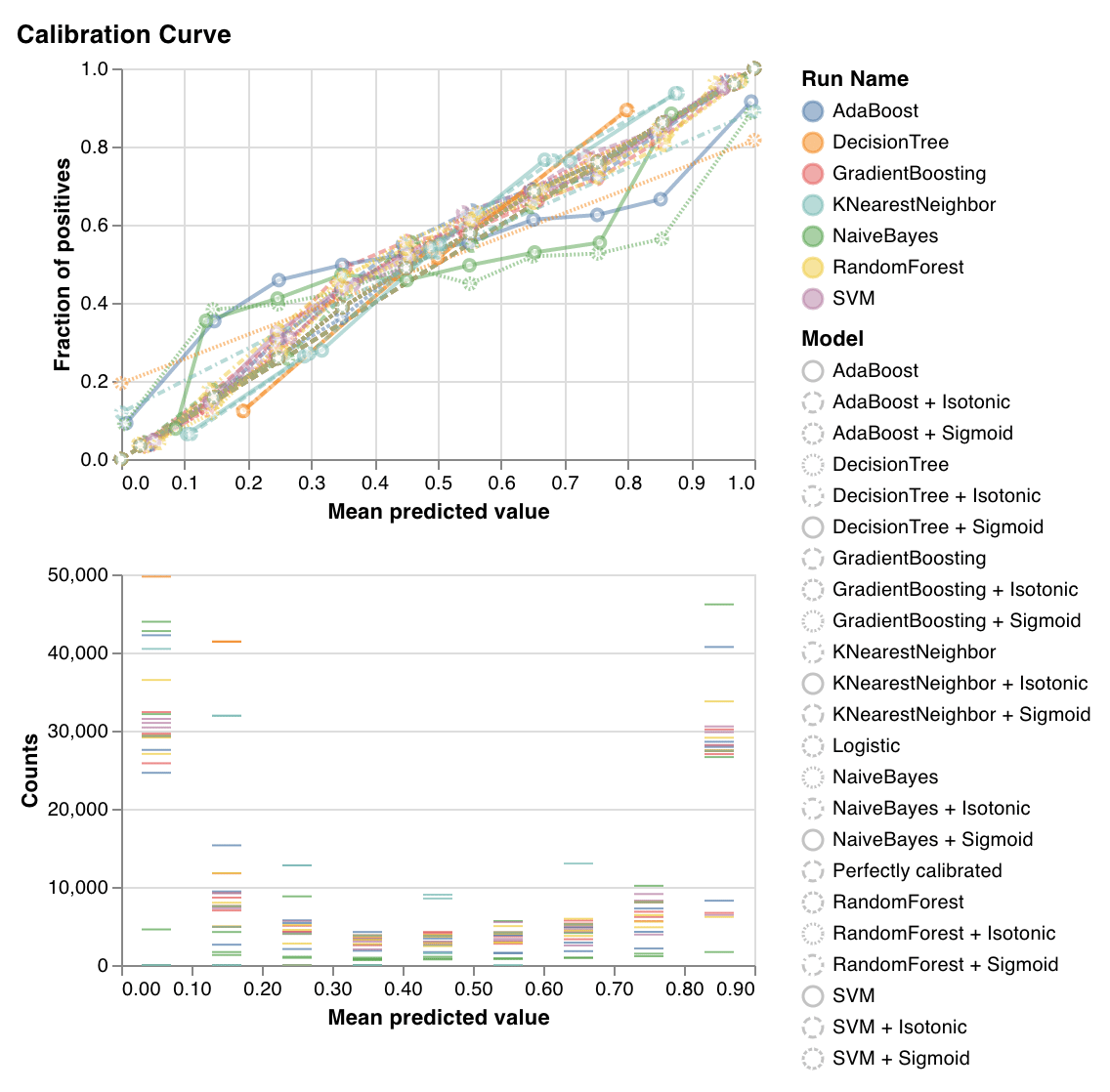 Plots how well calibrated the predicted probabilities of a classifier are and how to calibrate an uncalibrated classifier. Compares estimated predicted probabilities by a baseline logistic regression model, the model passed as an argument, and by both its isotonic calibration and sigmoid calibrations.
The closer the calibration curves are to a diagonal the better. A transposed sigmoid like curve represents an overfitted classifier, while a sigmoid like curve represents an underfitted classifier. By training isotonic and sigmoid calibrations of the model and comparing their curves we can figure out whether the model is over or underfitting and if so which calibration (sigmoid or isotonic) might help fix this.
For more details, check out [sklearn's docs](https://scikit-learn.org/stable/auto_examples/calibration/plot_calibration_curve.html).
`wandb.sklearn.plot_calibration_curve(clf, X, y, 'RandomForestClassifier')`
* model (clf): Takes in a fitted classifier.
* X (arr): Training set features.
* y (arr): Training set labels.
* model\_name (str): Model name. Defaults to 'Classifier'
### Confusion matrix
Plots how well calibrated the predicted probabilities of a classifier are and how to calibrate an uncalibrated classifier. Compares estimated predicted probabilities by a baseline logistic regression model, the model passed as an argument, and by both its isotonic calibration and sigmoid calibrations.
The closer the calibration curves are to a diagonal the better. A transposed sigmoid like curve represents an overfitted classifier, while a sigmoid like curve represents an underfitted classifier. By training isotonic and sigmoid calibrations of the model and comparing their curves we can figure out whether the model is over or underfitting and if so which calibration (sigmoid or isotonic) might help fix this.
For more details, check out [sklearn's docs](https://scikit-learn.org/stable/auto_examples/calibration/plot_calibration_curve.html).
`wandb.sklearn.plot_calibration_curve(clf, X, y, 'RandomForestClassifier')`
* model (clf): Takes in a fitted classifier.
* X (arr): Training set features.
* y (arr): Training set labels.
* model\_name (str): Model name. Defaults to 'Classifier'
### Confusion matrix
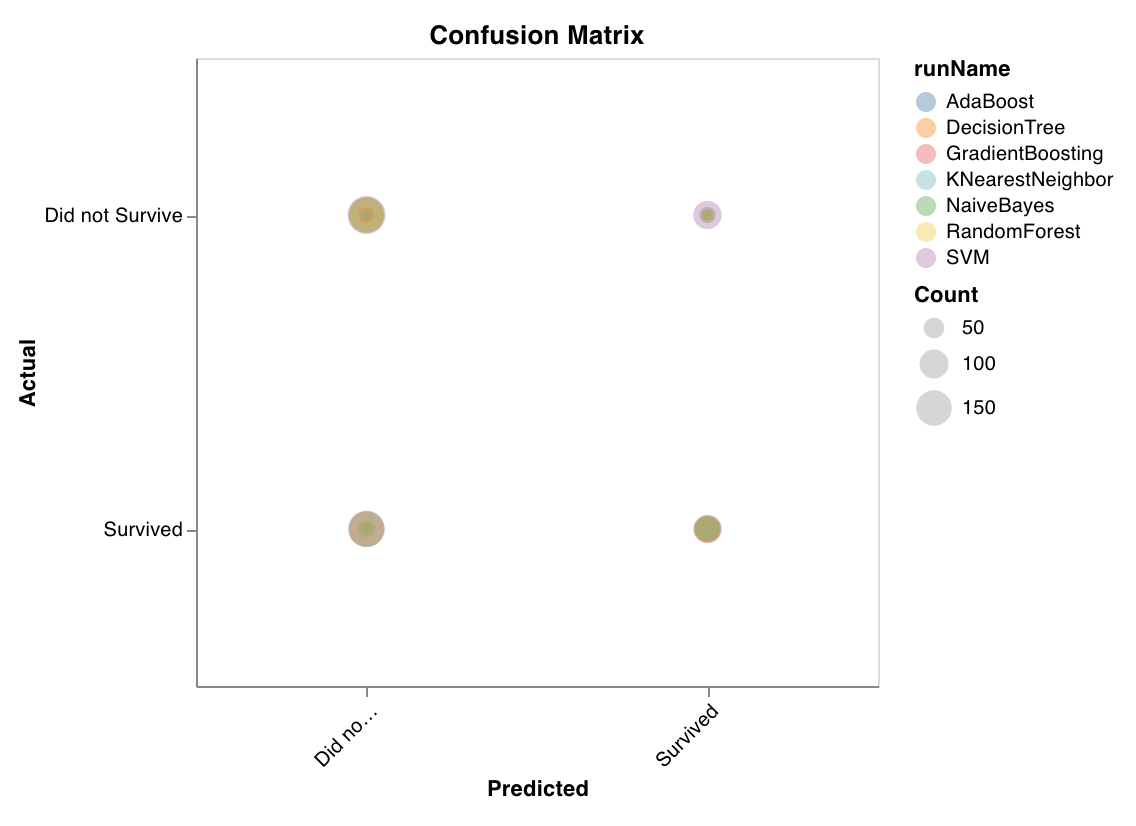 Computes the confusion matrix to evaluate the accuracy of a classification. It's useful for assessing the quality of model predictions and finding patterns in the predictions the model gets wrong. The diagonal represents the predictions the model got right, such as where the actual label is equal to the predicted label.
`wandb.sklearn.plot_confusion_matrix(y_true, y_pred, labels)`
* y\_true (arr): Test set labels.
* y\_pred (arr): Test set predicted labels.
* labels (list): Named labels for target variable (y).
### Summary metrics
Computes the confusion matrix to evaluate the accuracy of a classification. It's useful for assessing the quality of model predictions and finding patterns in the predictions the model gets wrong. The diagonal represents the predictions the model got right, such as where the actual label is equal to the predicted label.
`wandb.sklearn.plot_confusion_matrix(y_true, y_pred, labels)`
* y\_true (arr): Test set labels.
* y\_pred (arr): Test set predicted labels.
* labels (list): Named labels for target variable (y).
### Summary metrics
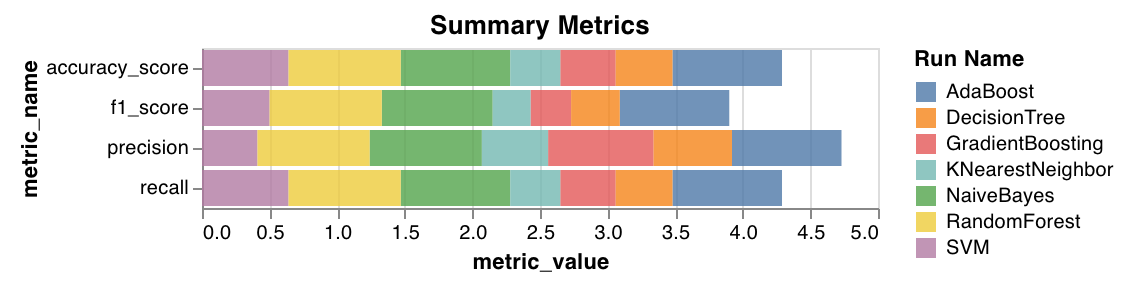 * Calculates summary metrics for classification, such as `mse`, `mae`, and `r2` score.
* Calculates summary metrics for regression, such as `f1`, accuracy, precision, and recall.
`wandb.sklearn.plot_summary_metrics(model, X_train, y_train, X_test, y_test)`
* model (clf or reg): Takes in a fitted regressor or classifier.
* X (arr): Training set features.
* y (arr): Training set labels.
* X\_test (arr): Test set features.
* y\_test (arr): Test set labels.
### Elbow plot
* Calculates summary metrics for classification, such as `mse`, `mae`, and `r2` score.
* Calculates summary metrics for regression, such as `f1`, accuracy, precision, and recall.
`wandb.sklearn.plot_summary_metrics(model, X_train, y_train, X_test, y_test)`
* model (clf or reg): Takes in a fitted regressor or classifier.
* X (arr): Training set features.
* y (arr): Training set labels.
* X\_test (arr): Test set features.
* y\_test (arr): Test set labels.
### Elbow plot
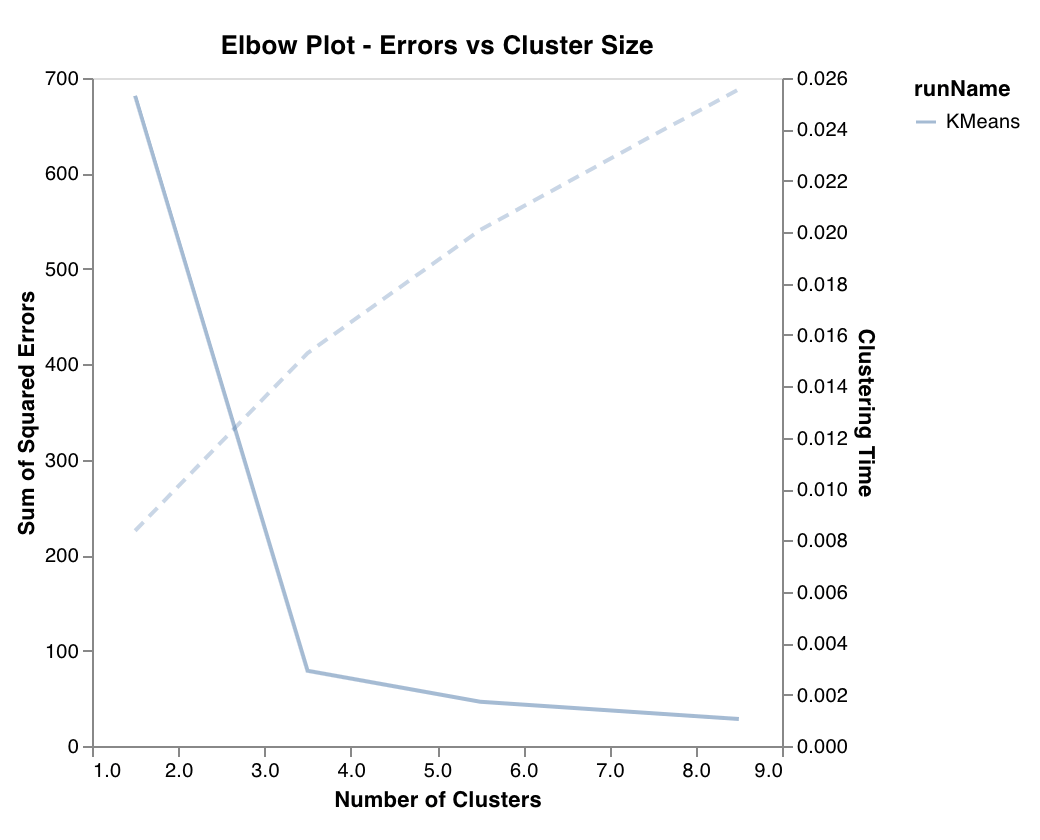 Measures and plots the percentage of variance explained as a function of the number of clusters, along with training times. Useful in picking the optimal number of clusters.
`wandb.sklearn.plot_elbow_curve(model, X_train)`
* model (clusterer): Takes in a fitted clusterer.
* X (arr): Training set features.
### Silhouette plot
Measures and plots the percentage of variance explained as a function of the number of clusters, along with training times. Useful in picking the optimal number of clusters.
`wandb.sklearn.plot_elbow_curve(model, X_train)`
* model (clusterer): Takes in a fitted clusterer.
* X (arr): Training set features.
### Silhouette plot
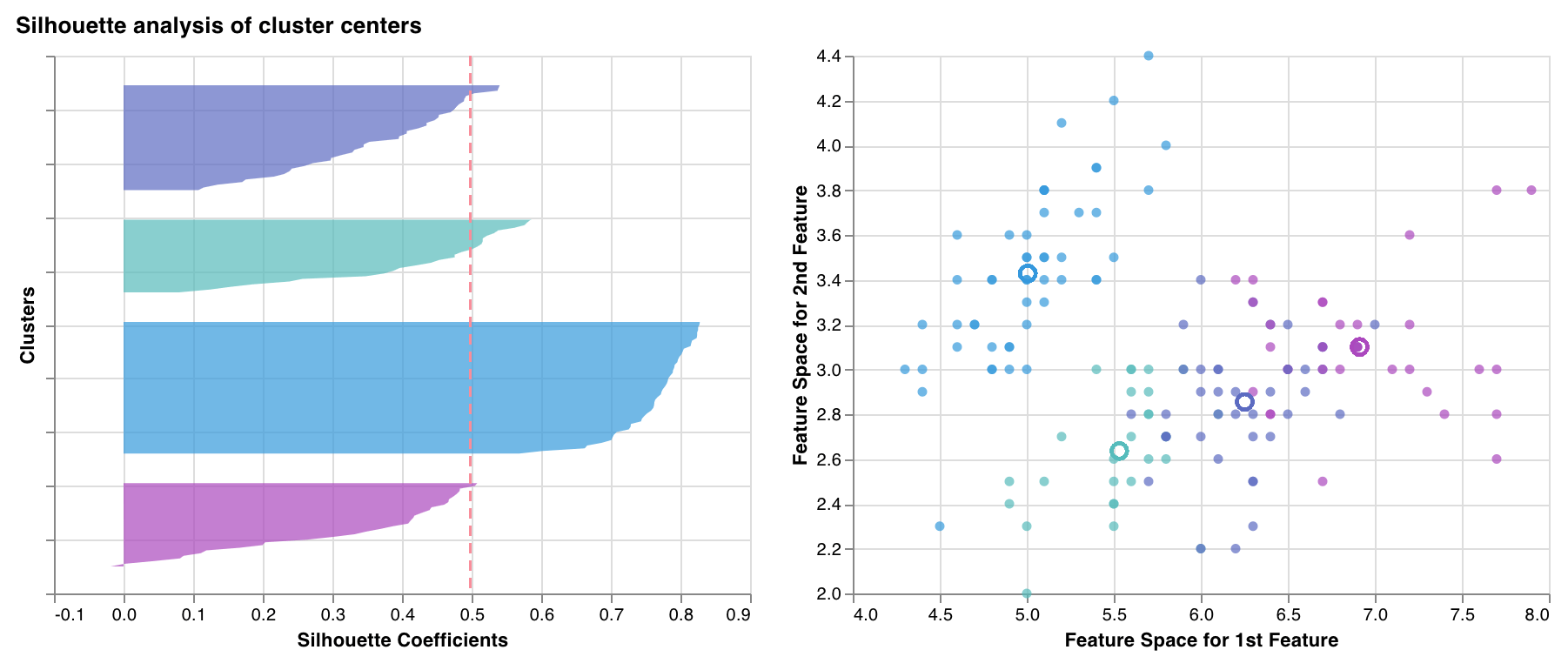 Measures & plots how close each point in one cluster is to points in the neighboring clusters. The thickness of the clusters corresponds to the cluster size. The vertical line represents the average silhouette score of all the points.
Silhouette coefficients near +1 indicate that the sample is far away from the neighboring clusters. A value of 0 indicates that the sample is on or very close to the decision boundary between two neighboring clusters and negative values indicate that those samples might have been assigned to the wrong cluster.
In general we want all silhouette cluster scores to be above average (past the red line) and as close to 1 as possible. We also prefer cluster sizes that reflect the underlying patterns in the data.
`wandb.sklearn.plot_silhouette(model, X_train, ['spam', 'not spam'])`
* model (clusterer): Takes in a fitted clusterer.
* X (arr): Training set features.
* cluster\_labels (list): Names for cluster labels. Makes plots easier to read by replacing cluster indexes with corresponding names.
### Outlier candidates plot
Measures & plots how close each point in one cluster is to points in the neighboring clusters. The thickness of the clusters corresponds to the cluster size. The vertical line represents the average silhouette score of all the points.
Silhouette coefficients near +1 indicate that the sample is far away from the neighboring clusters. A value of 0 indicates that the sample is on or very close to the decision boundary between two neighboring clusters and negative values indicate that those samples might have been assigned to the wrong cluster.
In general we want all silhouette cluster scores to be above average (past the red line) and as close to 1 as possible. We also prefer cluster sizes that reflect the underlying patterns in the data.
`wandb.sklearn.plot_silhouette(model, X_train, ['spam', 'not spam'])`
* model (clusterer): Takes in a fitted clusterer.
* X (arr): Training set features.
* cluster\_labels (list): Names for cluster labels. Makes plots easier to read by replacing cluster indexes with corresponding names.
### Outlier candidates plot
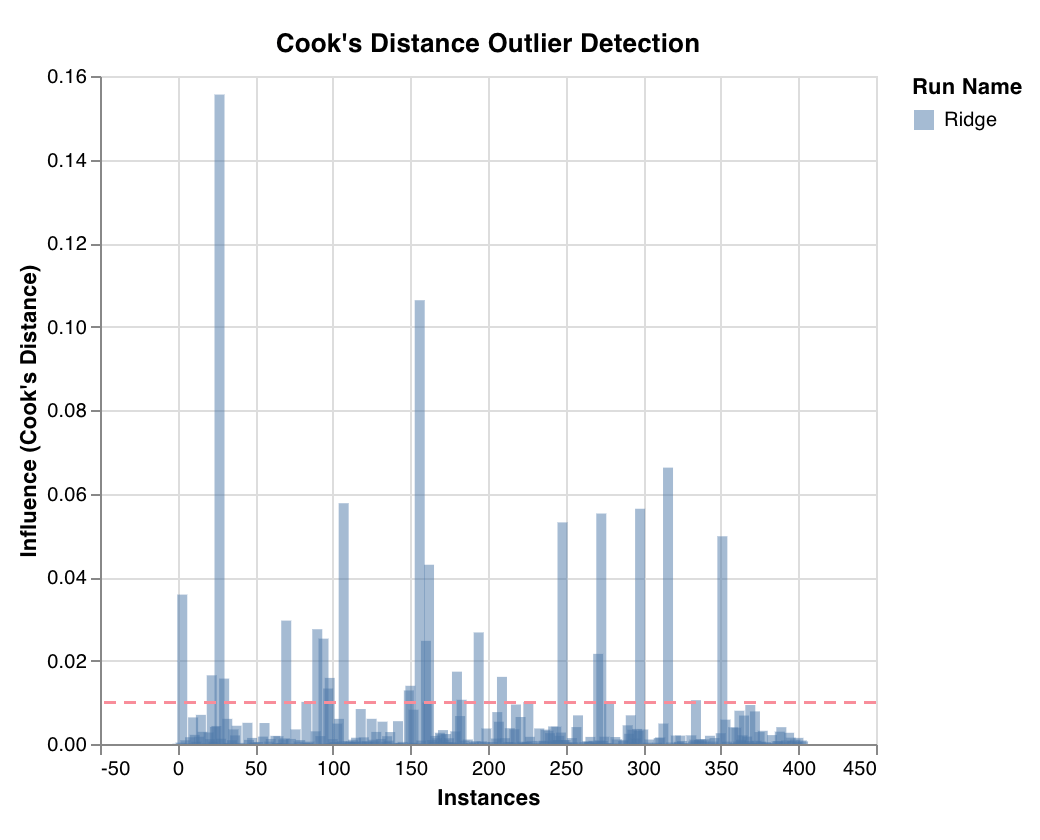 Measures a datapoint's influence on regression model via cook's distance. Instances with heavily skewed influences could potentially be outliers. Useful for outlier detection.
`wandb.sklearn.plot_outlier_candidates(model, X, y)`
* model (regressor): Takes in a fitted classifier.
* X (arr): Training set features.
* y (arr): Training set labels.
### Residuals plot
Measures a datapoint's influence on regression model via cook's distance. Instances with heavily skewed influences could potentially be outliers. Useful for outlier detection.
`wandb.sklearn.plot_outlier_candidates(model, X, y)`
* model (regressor): Takes in a fitted classifier.
* X (arr): Training set features.
* y (arr): Training set labels.
### Residuals plot
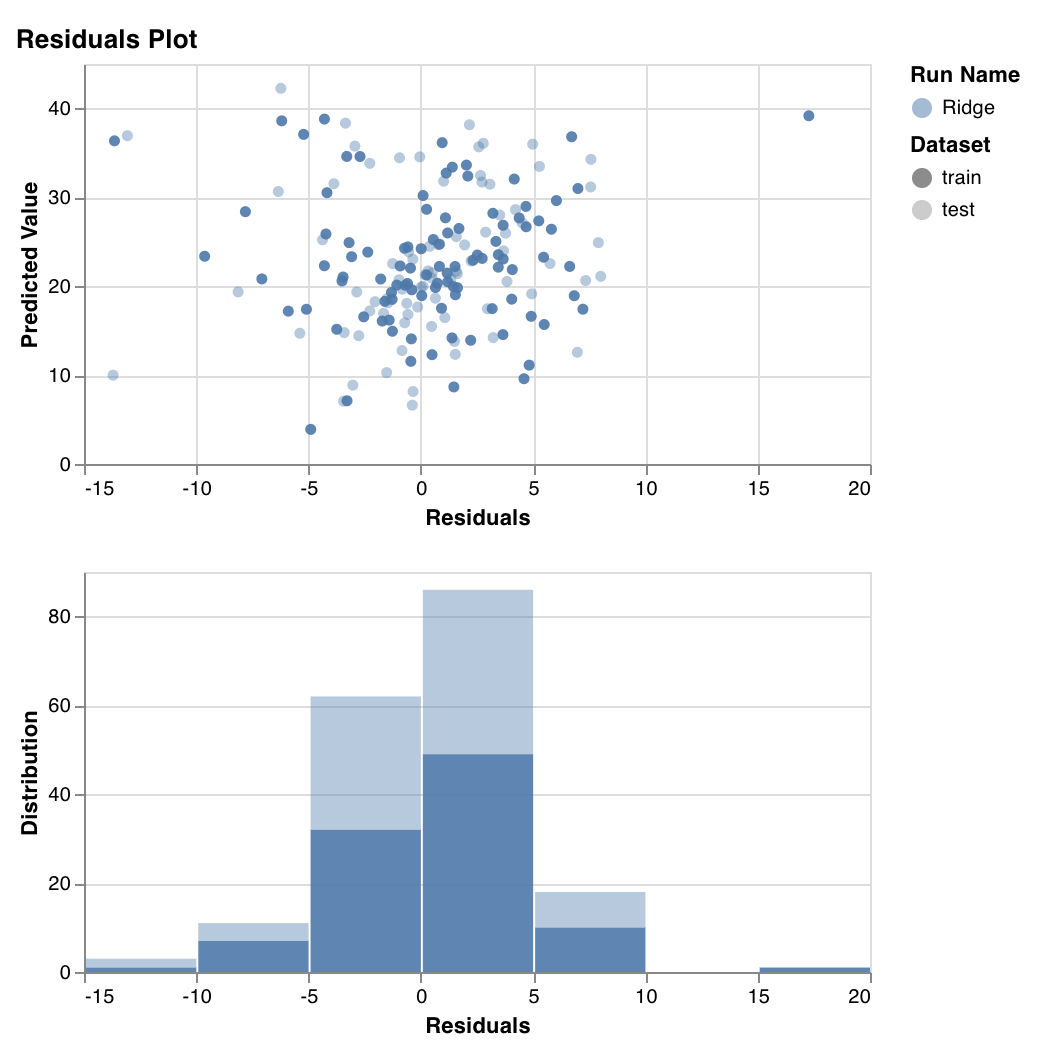 Measures and plots the predicted target values (y-axis) vs the difference between actual and predicted target values (x-axis), as well as the distribution of the residual error.
Generally, the residuals of a well-fit model should be randomly distributed because good models will account for most phenomena in a data set, except for random error.
`wandb.sklearn.plot_residuals(model, X, y)`
* model (regressor): Takes in a fitted classifier.
* X (arr): Training set features.
* y (arr): Training set labels.
If you have any questions, we'd love to answer them in our [slack community](https://wandb.me/slack).
## Example
* [Run in colab](https://wandb.me/scikit-colab): A simple notebook to get you started.
Measures and plots the predicted target values (y-axis) vs the difference between actual and predicted target values (x-axis), as well as the distribution of the residual error.
Generally, the residuals of a well-fit model should be randomly distributed because good models will account for most phenomena in a data set, except for random error.
`wandb.sklearn.plot_residuals(model, X, y)`
* model (regressor): Takes in a fitted classifier.
* X (arr): Training set features.
* y (arr): Training set labels.
If you have any questions, we'd love to answer them in our [slack community](https://wandb.me/slack).
## Example
* [Run in colab](https://wandb.me/scikit-colab): A simple notebook to get you started.